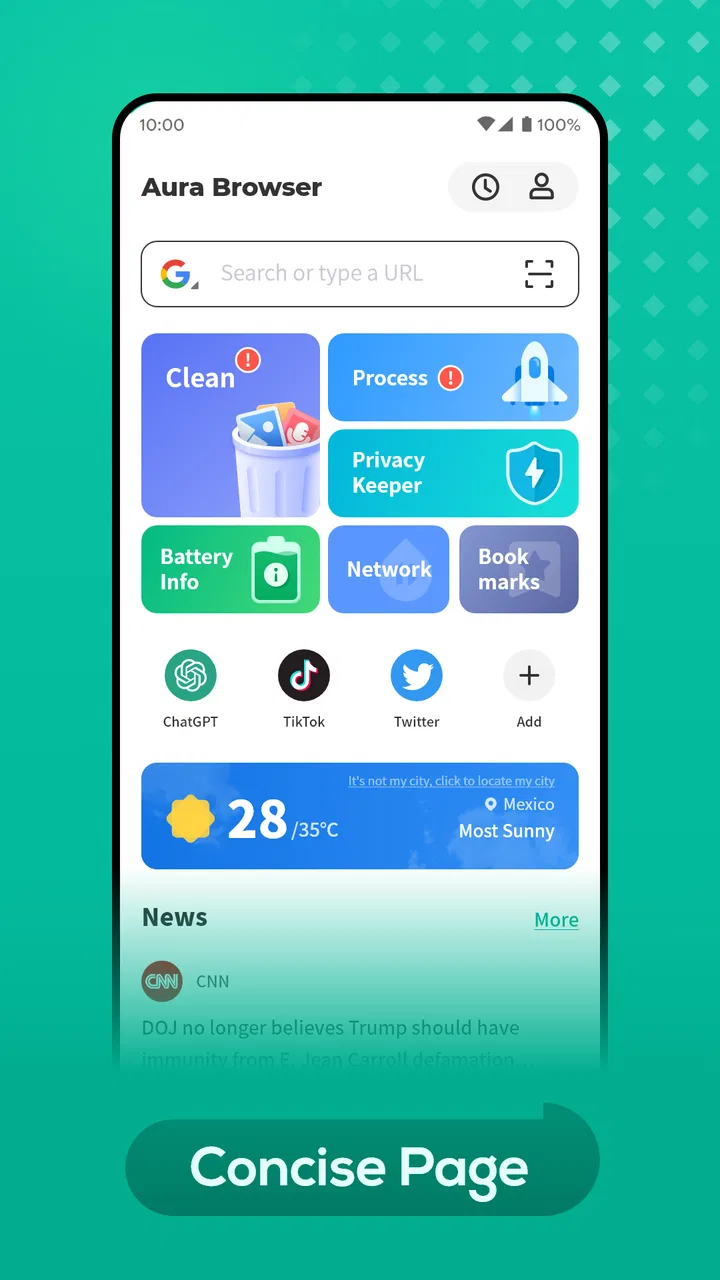
Aura Browser
- 3.6
- Rating
- 1.00M
- Installs
- Free
- Price

 Analysis by App-foxy
I spent time using Aura Browser as a practical everyday browser rather than treating it like a feature checklist. Its store summary calls it “Your smart browser,” while the short description simply presents it as Aura Browser. That modest positioning is useful: this is a free tools app from Jerome Easy Tools, and its main question is not whether it replaces every browser, but whether it gives you a comfortable, sensible way to browse on an Android phone.
My overall impression is positive but measured. Aura Browser feels aimed at people who want a straightforward browsing tool without paying for it or learning a complicated interface. At the same time, trust matters more with any browser than with many other apps because a browser sits between you and almost everything you do online. I therefore paid particular attention to visible choices, account-related friction, permission prompts, and the moments when browsing becomes sensitive. The result is an app I can recommend for casual and secondary use, with some important reservations for people who need the deepest privacy controls or the most mature synchronization system.
What Aura Browser feels like in everyday use
The first thing I noticed is that Aura Browser is easy to understand. You open it, enter a web address or search phrase, and begin. That sounds basic, but it is exactly what many people want from a browser on a small screen. I did not feel pushed into a complicated setup before I could read an article, check a timetable, open a help page, or look up a product.
You May Also Like

 Blood Strike: 2.5 Anniversary
Blood Strike’s Loadouts Turn Every Drop Into a Tactical Gamble
A close look at Blood Strike’s custom loadouts: how fast access to signature weapons reshapes its battle royale rhythm, rewards preparation, and narrows the gap between fights.

 Pandora - Music & Podcasts
Pandora’s Music Is Easy to Start, but Harder to Recover
Pandora’s strength is its low-effort path from a seed to a station. Its weak spot is how much confidence it asks you to place in connection, setup, and quiet recovery.

 8 Ball Pool
 Is Built on Rivalries, Rematches, and Routine
A close look at the rivalries, rematches, shared routines, and unanswered safety questions that turn a quick pool match into a persistent mobile community.

 Samsung Music
’s Quiet Strength Is Playing What You Already Own
Its reach comes less from spectacle than from dependable access to a personal library. That simplicity is both the app’s strongest retention engine and its ceiling.

 AccuWeather: Weather Radar
AccuWeather Review: A Quick, Clear Forecast for Everyday Decisions
For everyday plans, the best forecast is the one you can understand quickly. AccuWeather makes rain timing, radar, and local conditions easy to act on, with a few trade-offs.

 Hill Climb Racing
Why Hill Climb Racing Still Turns Crashes Into One More Run
A tiny car, a bumpy hill and one more upgrade: Hill Climb Racing keeps resurfacing because its simple chaos makes every near-miss feel personal.
More From Our News Desk



That simplicity makes it suitable for a second browser. I can imagine keeping it for shopping research, temporary searches, reading unfamiliar sites, or using a phone that is shared with family members. It is also a reasonable option for someone who finds the settings of larger browsers overwhelming and wants to start with fewer decisions.
The app belongs in the tools category, and that description fits better than calling it a social or entertainment product. Its value comes from reducing the distance between a question and a web page. I would not install it expecting a new way to use the internet; I would install it because a lightweight, uncomplicated browser can be convenient when the default option feels cluttered.
A realistic example is a short workday errand. I might receive a message containing a restaurant menu, open the page in Aura Browser, compare opening times with another site, copy an address, and close the session. For that kind of task, the browser does not need to become the center of my digital life. It simply needs to get out of the way, display pages properly, and let me decide what happens next.
Who is likely to appreciate it
Aura Browser is a good match for Android users who want a free browser with an uncomplicated starting point. It is also worth considering if you prefer separating browsing contexts: one browser for your regular accounts and another for quick searches or less important websites. That separation is not the same as complete anonymity, but it can make personal organization easier.
The app is available to users rated Everyone, which makes its broad audience clear. Parents should still remember that an age label is not a substitute for supervision. A browser provides access to the wider web, so the suitability of what someone views depends on the websites they visit, their device settings, and the guidance they receive.
It is less convincing for people who depend on a polished desktop-to-phone workflow, extensive add-ons, highly detailed anti-tracking settings, or a long-established ecosystem. If your daily browsing depends on saved passwords, synchronized tabs, custom extensions, and carefully tuned privacy rules, a major browser may remain the better tool. Aura Browser makes more sense when simplicity is a priority rather than when you need a complete power-user environment.
Trust starts with what the app asks me to decide
With a browser, I do not judge trust only by appearance. A clean screen can be pleasant, but it does not tell me how an app handles browsing-related information. I look for clear permission prompts, understandable settings, and choices that do not force me to surrender more control than the task requires.
My practical advice is to read every prompt instead of tapping through automatically. If Aura Browser asks for access that is unrelated to the action I am taking, I would pause and decide whether the request makes sense. When a website asks for location, notifications, camera access, or another sensitive capability, I treat that as a website-level decision rather than something the browser should receive casually.
This approach is especially important on Android because permissions can affect the whole device experience. I prefer granting access only when I understand why it is needed, and I revisit permissions later if an app no longer needs them. That is not a criticism aimed specifically at Aura Browser; it is the right habit for any browser because browsing brings many different websites into one application.
I also avoid assuming that private-looking browsing automatically means private browsing. A browser can offer a convenient temporary session while network providers, websites, or signed-in services still recognize activity in their own ways. Aura Browser should therefore be treated as a browsing tool, not as a guarantee of invisibility. That distinction is one of the most important things a new user should understand before making it their only browser.
Permissions and data-sensitive moments
The most sensitive moments are not always the first launch. They happen when I search for health information, open financial services, sign in to an account, upload a document, or allow a website to remember a device. In those situations, I slow down. I check the address bar, avoid entering credentials on pages reached through suspicious messages, and think carefully before accepting every cookie or notification request.
Aura Browser can be useful in these situations because a separate browser profile or app can help me keep a particular activity apart from my main browsing routine. For example, I might use it to inspect a website before deciding whether I want to sign in through my primary browser. That is a workflow benefit, not a promise that the app itself removes all tracking or risk.
For banking, government services, password management, or confidential work, I would choose the browser that gives me the strongest confidence in its security updates, account protections, and privacy controls. A smaller browser can still open these sites, but opening a page is not the same as providing the level of assurance I want for sensitive transactions. I would also avoid saving important credentials in a browser unless I had reviewed its account and storage options carefully.
Another useful habit is to clear a session after using a shared phone. I do not rely on closing a tab alone. I check whether the page left behind a signed-in state, downloaded files, or form information. This is one of the less obvious trade-offs of using a browser as a quick utility: convenience can encourage careless leftovers. Aura Browser works best when I treat each browsing session as something I can deliberately start and finish.
How much control does the user really have?
User agency is the area I care about most. A browser should let me choose whether to continue, go back, close a page, change a setting, or deny a request. I prefer interfaces where the next action is obvious and where a website cannot make me feel trapped by repeated prompts or confusing redirects.
When I use Aura Browser for ordinary searches, I keep my choices simple. I do not accept notifications merely to remove a banner, and I do not allow location access when a typed city name is enough. If a site insists on a permission that does not fit the task, I leave it. This gives me more control than trying to undo a long chain of permissions later.
I also recommend separating browsing decisions from account decisions. If I am already signed in to a major service, the browser may make it easy to continue with that account. That can save time, but it can also connect a casual search with a personal profile. For searches I want to keep separate from my normal account activity, I use a fresh session and avoid signing in unnecessarily.
These are not glamorous features, but they are meaningful controls. A smart browser should not make every decision for me. In my experience, Aura Browser is most comfortable when I use it deliberately: choose the site, inspect the request, complete the task, and clean up afterward when the subject is personal.
Where it compares well with familiar alternatives
Compared with the browser that arrives preinstalled on many Android phones, Aura Browser may appeal to users who want a different, less familiar environment for selected tasks. The main advantage is not that it transforms browsing; it is that it can provide a separate place to work without changing the settings of the browser I use every day.
Compared with privacy-focused alternatives, I would be more cautious. Those browsers often attract users who want clearly exposed anti-tracking tools, aggressive blocking, or a strong privacy identity. Aura Browser’s appeal is easier access and a lighter commitment. If privacy controls are the reason you are changing browsers, I would compare the settings screens and permission behavior directly before switching.
Compared with full-featured mainstream browsers, Aura Browser is better suited to a focused role than to a deeply connected digital ecosystem. A mainstream option may be preferable if I move constantly between a phone and a computer, rely on synchronized passwords, or need a large extension library. Aura Browser is more attractive when I want to open pages without building my entire workflow around one account.
That distinction also affects performance expectations. I would not judge the app by whether it has every advanced feature found in a long-established browser. I judge it by whether its simpler approach saves time and avoids unnecessary friction. For a secondary browser, that can be enough. For a primary browser used for work, study, and personal finance, I would demand more visible depth.
Version, support expectations, and practical setup
Aura Browser was released on September 10, 2024, and the current version is 1.5.9. It requires Android 8.0 or later, so it remains relevant to devices that are not running the newest Android release. The app has passed 500K installs and holds an average rating of 4.2 from around 1.6K ratings, which suggests that many users find the basic experience worthwhile without making that score a guarantee for every phone.
Jerome Easy Tools is the developer behind the app. I would keep the app updated through the official Android store and pay attention to update notes, especially because browsers interact with changing web standards and security practices. A browser can feel fine today and still need maintenance as websites, certificates, and operating systems evolve.
Because Aura Browser is free, the financial barrier is low. That makes testing it easy: I can try it for ordinary, low-risk browsing without committing to a subscription. Still, free does not mean I should stop evaluating permissions, account prompts, or data choices. Price tells me what I pay, not automatically what information an app or the websites it opens may process.
My preferred setup is conservative. I would begin without granting optional permissions, avoid signing in until I know I want to keep using the browser, and test it with harmless tasks such as reading public pages or checking local information. After that, I would inspect how comfortable I am with its controls before moving sensitive activity into it. This staged approach gives me useful evidence without exposing important accounts unnecessarily.
Small workflows that make the app more useful
One practical workflow is temporary research. I can open several pages about a purchase, compare specifications, and then close the browser without mixing that research with the pages I normally keep open. I still check downloads and sign-in states afterward, but the separation helps reduce clutter.
A second workflow is link checking. When someone sends me an unfamiliar link, I can open it in Aura Browser first, inspect the domain, and decide whether it deserves further attention. I never treat a different browser as a security shield, but using a separate context can make me less likely to enter credentials impulsively on a page I have not evaluated.
A third is shared-device browsing. If I occasionally lend my phone to someone who needs to look up a public page, a separate browser can prevent my main browser from becoming filled with their tabs and history. Before handing over the phone, I would still close existing pages and review whether any personal account is active. Afterward, I would clear the temporary material rather than assuming the separation handled everything.
There is also a useful trade-off for people who dislike notification overload. I treat every website notification request as optional unless I have a clear reason to receive alerts. News, shopping, and social sites often want to remain present after I leave them. Refusing those requests keeps a browser from becoming another source of interruptions, and it preserves my attention without requiring complicated customization.
What could make me choose another browser
I would skip Aura Browser as my main browser if I needed a mature cross-device system. Someone who edits documents on a computer, checks the same tabs on a tablet, and relies on a unified password workflow may be happier with the browser already connected to that ecosystem. Rebuilding those habits in a simpler app could create more work than it saves.
I would also choose another option if my main reason for switching were advanced privacy. In that case, I want to see clearly labeled controls, understandable explanations, and a privacy model that matches my expectations. Aura Browser can be used cautiously, but cautious use is not the same as specialized privacy protection.
People who need extensions, developer tools, enterprise controls, or highly predictable compatibility should also look carefully before making a change. A browser can be perfectly adequate for reading and searching while still being the wrong instrument for specialized work. I would test the exact websites and workflows that matter rather than relying on a general impression.
My cautious recommendation
After using Aura Browser as a practical Android tool, I see its strongest role as a free, approachable browser for casual browsing, temporary research, and separating selected activities from a primary browser. Its Everyone rating, broad install base, and solid 4.2 average make it easy to consider, while the current 1.5.9 release and Android 8.0 requirement keep the basic entry point accessible to many users.
My recommendation comes with a clear boundary: I would not mistake its simple experience for a complete privacy strategy. I would inspect permissions, reject unnecessary website requests, avoid careless sign-ins, and clean up sensitive sessions. Those habits matter more than a friendly interface when a browser is involved.
If you want a straightforward second browser and are comfortable making your own careful choices, Aura Browser is worth trying. If you need powerful synchronization, specialist tools, or privacy controls that are central to your decision, compare it closely with established alternatives before moving everything over. The best way to use Aura Browser is as a convenient tool whose limits you understand, not as a substitute for your own online judgment.
FAQs for Aura Browser
01What platforms is Aura Browser available on?
Aura Browser is available for both Android and iOS platforms. It can be downloaded from the Google Play Store for Android devices and the Apple App Store for iOS devices. Ensure your device meets the minimum system requirements for optimal performance.
02Does Aura Browser support extensions and add-ons?
Yes, Aura Browser supports a variety of extensions and add-ons to enhance functionality. Users can browse the available extensions within the app to customize their browsing experience according to their needs, such as ad blockers, password managers, and more.
03How does Aura Browser protect user privacy and data?
Aura Browser is designed with user privacy in mind, featuring built-in security measures like encrypted connections and a no-tracking policy. The browser also offers private browsing modes and customizable privacy settings to help users control their data and maintain anonymity online.
04What unique features does Aura Browser offer compared to other browsers?
Aura Browser offers unique features like a customizable interface, integrated voice search, and AI-driven recommendations. Additionally, it provides fast loading speeds and offline reading options, making it a versatile choice for users looking for a comprehensive browsing solution.
05Is Aura Browser free to use, or does it require a subscription?
Aura Browser is free to download and use, with no mandatory subscription fees. However, it may offer optional in-app purchases or premium features for users who wish to enhance their browsing experience further. Always check the app details for any additional costs.
Pros
- Fast page loading speeds.
- User-friendly interface design.
- Built-in ad blocker enhances privacy.
- Customizable themes and settings.
- Supports multiple languages.
Cons
- Consumes more battery than expected.
- Occasional crashes on older devices.
- Limited extensions compared to competitors.
- Some features require premium upgrade.
- Lacks offline reading mode.

Aura Browser
Gallery